Quick start
If you just want a working example you can clone the example repository
Setting up an entity
-
Make sure you have followed the Installation section instructions beforehand.
-
Create a new Kotlin file called
User.ktand paste this code:
import io.kotgres.orm.annotations.Generated
import io.kotgres.orm.annotations.PrimaryKey
import io.kotgres.orm.annotations.Table
import java.time.LocalDateTime

@Table(name = "users")
data class User(
    @PrimaryKey
    @Generated
    val id: Int,
    val name: String,
    val email: String,
    val age: Int,
    val description: String?,
    val createdAt: LocalDateTime,
    val updatedAt: LocalDateTime,
)
As you can see, we are creating a new User entity and defining how it looks on the database so the ORM can map it correctly.
This would be an equivalent SQL file:
CREATE TABLE IF NOT EXISTS users
(
    id          int GENERATED BY DEFAULT AS IDENTITY PRIMARY KEY,
    name        TEXT NOT NULL,
    email       TEXT NOT NULL,
    age         INT  NOT NULL,
    description TEXT,
    created_at  TIMESTAMP DEFAULT now(),
    updated_at  TIMESTAMP DEFAULT now()
);
- Run a Gradle
build(you can do that in IntellIJ > Right Panel > Tasks > build > build)
After it finishes you should see the generated Data Access Object file inside your project generated files: build/generated/ksp/main/kotlin/<your_package>/dao/UserDao
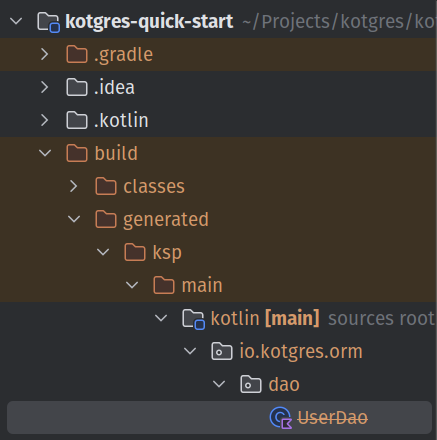
This is the class you will be using to access the entity table in the database.
- Now let's create a new file
Main.ktand let's add:
First the database connection code:
import io.kotgres.orm.connection.KotgresConnectionPool
import io.kotgres.orm.connection.KotgresConnectionPoolConfig

val connectionPool = KotgresConnectionPool.build(
    KotgresConnectionPoolConfig(
        "0.0.0.0", // host
        "kotgres", // database name
        54333, // port
        "kotgres", // username
        "kotgres", // password
    ),
)
And a sample main to test that it works:
import io.kotgres.orm.dao.PrimaryKeyDao
import io.kotgres.orm.manager.DaoManager
import java.time.LocalDateTime

<...>

fun main() {
    connectionPool.runQueryVoid(
        """
            CREATE TABLE IF NOT EXISTS users
            (
                id          int GENERATED BY DEFAULT AS IDENTITY PRIMARY KEY,
                name        TEXT NOT NULL,
                email       TEXT NOT NULL,
                age         INT  NOT NULL,
                description TEXT,
                created_at  TIMESTAMP DEFAULT now(),
                updated_at  TIMESTAMP DEFAULT now()
            );
        """.trimIndent()
    )

    val userDao: PrimaryKeyDao<User, Int> = DaoManager.getPrimaryKeyDao(connectionPool)

    val insertedUser =
        userDao.insert(User(-1, "kotgres", "kotgres@kotgres.io", 42, null, LocalDateTime.now(), LocalDateTime.now()))
    println("New user has id ${insertedUser.id}")

    val allUsers = userDao.getAll()

    println("There are ${allUsers.size} users in the database")
}
- Before running the code, you will need a database engine running on
localhost:54333, with the username, password and database name:kotgres
You can quickly bring one up, using docker. You can install it here.
Once you have it, you can paste this code in a docker-compose.yml file:
services:
  db:
    image: postgres:15.1-alpine
    container_name: "kotgres-example-quick-start"
    environment:
      - POSTGRES_USER=kotgres
      - POSTGRES_PASSWORD=kotgres
      - POSTGRES_DB=kotgres
    ports:
      - '54333:5432'
And just run docker compose up -d
- If you now run your
mainfunction inMain.ktyou should get a result like this in console:
New user has id 1
There are 1 users in the database
- Congratulations 🎉 You have successfully created a Kotlin application that uses Kotgres to connect to a PostgreSQL database!
Next steps
Feel free to play around with userDao to learn more about what you can do! Here is a list of some methods you can try:
userDao.update: to update entitiesuserDao.delete: to delete entities by passing the entityuserDao.deleteById: to delete entities by passing the iduserDao.getByPrimaryKey: to get an entity by its primary keyuserDao.runSelect&&userDao.selectQuery: to run complex select queries returning an entity